Recent Searches
Category

Microsoft Power BI

Category

Microsoft Excel

Category

Microsoft Copilot Courses

Category

SharePoint

Category

Professional Development

Category

Microsoft Project

Category

Power Automate

Category

Power Apps

Category

AI for Business

Category

SQL

Category

Microsoft 365

Category

Microsoft Word

Category

Python

Category

Microsoft Teams

Category

Excel Specialist

Category

Microsoft PowerPoint

Category

Microsoft Outlook

Category

R Programming

Category

Microsoft Access

Category

Microsoft Visio

Category

HTML Courses

Category

WordPress

Category

Microsoft Windows 11 Courses

Category

Adobe InDesign Courses

Category

Adobe Premiere Pro Training

Category

Adobe After Effects Training

Category

Adobe Photoshop Courses

Category

Adobe Illustrator Courses

Category

Canva Courses

Category

Articulate

Category

Adobe Acrobat Courses

Category

Adobe Animate Training

Category

Adobe Captivate Training

Course

Power BI Beginner

Course

Excel Beginner

Course

Copilot for M365

Course

SharePoint Beginner

Course

Achieving Leadership & Success

Course

Project Beginner

Course

Power Apps Beginner

Course

SQL Beginner

Course

Word Beginner

Course

Word Advanced

Course

Word Intermediate

Course

Python Beginner

Course

Teams Essentials

Course

Financial Modelling

Course

PowerPoint Level 1

Course

Microsoft Outlook Beginner to Intermediate

Course

R Programming Beginner

Course

Microsoft Access Essentials

Course

Visio Essentials

Course

HTML Training Intro

Course

Windows 11 End User Course

Course

InDesign Lite

Course

Premiere Training Intro

Course

After Effects Training Intro

Course

Photoshop Lite

Course

Illustrator Training Intro

Course

Articulate Storyline 360 Essentials

Course

Acrobat Essentials

Course

Animate Training Intro

Course

Captivate Training

Course

Power BI Intermediate

Course

Excel Intermediate

Course

Copilot for Word

Course

SharePoint Intermediate

Course

Anger Management & Negotiation Skills

Course

Project Intermediate

Course

Power Apps Intermediate

Course

ChatGPT Beginner

Course

SQL Intermediate

Course

Python Intermediate

Course

Analysis and Dashboards

Course

PowerPoint Level 2

Course

R Programming Intermediate

Course

InDesign Training Intro

Course

Photoshop Training Intro

Course

Articulate Storyline 3 & 360 Advanced

Course

Acrobat Forms

Course

Power BI Advanced

Course

Excel Advanced

Course

Copilot for Excel

Course

SharePoint Advanced (Site Owner)

Course

Assertiveness & Confidence

Course

Project Advanced

Course

Power Apps Intermediate | Power Automate + Power BI Integration

Course

AI Prompting Fundamentals

Course

Python Advanced

Course

Excel VBA

Course

R Programming Advanced

Course

Microsoft Access Advanced

Course

InDesign Training Advanced

Course

Canva Beginners

Course

Power BI DAX

Course

Excel Expert

Course

Copilot for PowerPoint

Course

SharePoint Advanced (Document Governance)

Course

Building Resilience

Course

Power Apps Advanced

Course

Machine Learning in R

Course

Canva Intermediate

Course

Copilot for Outlook and Teams

Course

Coaching and Mentoring

Course

Canva Advanced

Course

Communications

Course

WordPress Essentials

Course

Premiere Basics Training

Course

Advanced After Effects Training

Course

Illustrator Training Advanced

Course

Canva AI

Course

Microsoft Copilot Agent Builder

Course

Communications & Quality Client Service Training

Course

AI for Business Leaders and Managers

Course

Advanced Premiere Training

Course

Photoshop Training Advanced

Course

Power BI Copilot Training

Course

Critical Thinking and Problem Solving

Course

AI Governance Training

Course

InDesign Interactivity Training

Course

Copilot for Customer Service

Course

Cultural Diversity in the Workplace

Course

InDesign Accessibility Training

Course

Copilot for Executives and Managers

Course

Embracing Change

Course

Microsoft Outlook Advanced

Course

Copilot for Finance

Course

Growing Emotional Intelligence

Course

SQL Advanced

Course

Copilot for HR

Course

Minute Taking

Course

Planner Premium

Course

Excel Tables and Pivot Tables

Course

Copilot for Legal Services

Course

Power Automate Beginner

Course

Microsoft 365 Essentials

Course

Data Transformation with Power Query

Course

Excel Macro Mastery

Course

Copilot for Marketing

Course

Persuasion and Negotiation Skills

Course

Power Automate Intermediate

Course

Power BI Desktop Advanced Reporting

Course

Copilot for Operations

Course

Presentation Skills and Public Speaking

Course

Data Visualisation with Power BI Desktop

Course

Copilot for Sales

Course

Practical Project Management

Course

Respect, Equity and Diversity (RED)

Course

Resumé Writing and Interview Skills

Course

Stress Management

Course

Team Leadership, Management and Development

Course

Time Management Intensive

Course

Train the Trainer

Course

Write Effective Business Documents

Course

Dealing with Difficult People

Course

Managing Difficult Conversations

Course

Managing the Virtual Workplace

Course

Customer Service Training

Course

Technical Writing

Role-Based Microsoft Copilot Workshops

Nexacu | Jul 15
Microsoft Copilot Training • Role-Based Workshops • AI for Business

The Complete Guide to Nexacu’s Role-Based Microsoft Copilot Workshops

Microsoft Copilot is changing how teams work across Word, Excel, Outlook, Teams and other Microsoft 365 apps. But each business function uses Copilot differently. This guide explains Nexacu’s role-based Microsoft Copilot workshops and helps you choose the right training pathway for your team.

AI
Quick answer

Role-based Microsoft Copilot workshops help teams learn Copilot through examples that match their actual work. Instead of teaching every employee the same generic prompts, these workshops focus on practical use cases for specific roles such as finance, HR, sales, marketing, operations, legal, customer service and management.

Best starting point: Choose the workshop that matches your team’s daily responsibilities, then use AI for Business Leaders and Managers for senior leaders who need strategy, governance and adoption planning.

Many organisations have invested in Microsoft Copilot licences, but adoption does not automatically follow. Some staff use Copilot only for basic drafting. Others are unsure how to prompt effectively, check outputs or apply Copilot to their role.

This is where role-based training matters. A finance team, HR team, sales team and operations team do not need the same examples. They need training that reflects the work they already do.

Nexacu’s role-based Microsoft Copilot workshops are designed to help different teams apply Copilot to practical workplace scenarios in a focused half-day format.

What you will learn
How each role-based Copilot workshop supports a specific business function.
Why it matters
Role-specific examples make Copilot easier to adopt and apply at work.
Who it is for
Teams, managers, L&D leaders and organisations rolling out Microsoft Copilot.

TL;DR: If your organisation has Copilot but people are not using it consistently, role-based workshops can help.

Start with the team that has the clearest use case, such as finance reporting, HR communication, sales preparation, marketing content, customer service responses or management briefings.

1) Why Role-Based Copilot Training Matters

Microsoft Copilot can support drafting, summarising, analysis, meeting preparation, research, planning and communication. But its value depends on how well people understand when to use it, how to prompt it and how to check the output.

A generic Copilot course can help users understand the basics. Role-based workshops go further by showing teams how Copilot applies to their own work. This makes the training more relevant and easier to put into practice.

Practical read: Role-based Copilot training helps turn Copilot from a general AI tool into a practical workplace assistant for specific teams and functions.

For example, a finance team may need support with reporting commentary and data analysis. A sales team may need account research and follow-up preparation. A HR team may need policy drafts, internal communications and workforce planning support. Each team benefits from different examples.

2) Nexacu’s 8 Role-Based Microsoft Copilot Workshops

Nexacu offers role-based Copilot workshops for eight common business functions. Each workshop is designed to help participants use Copilot with more structure, confidence and practical relevance.
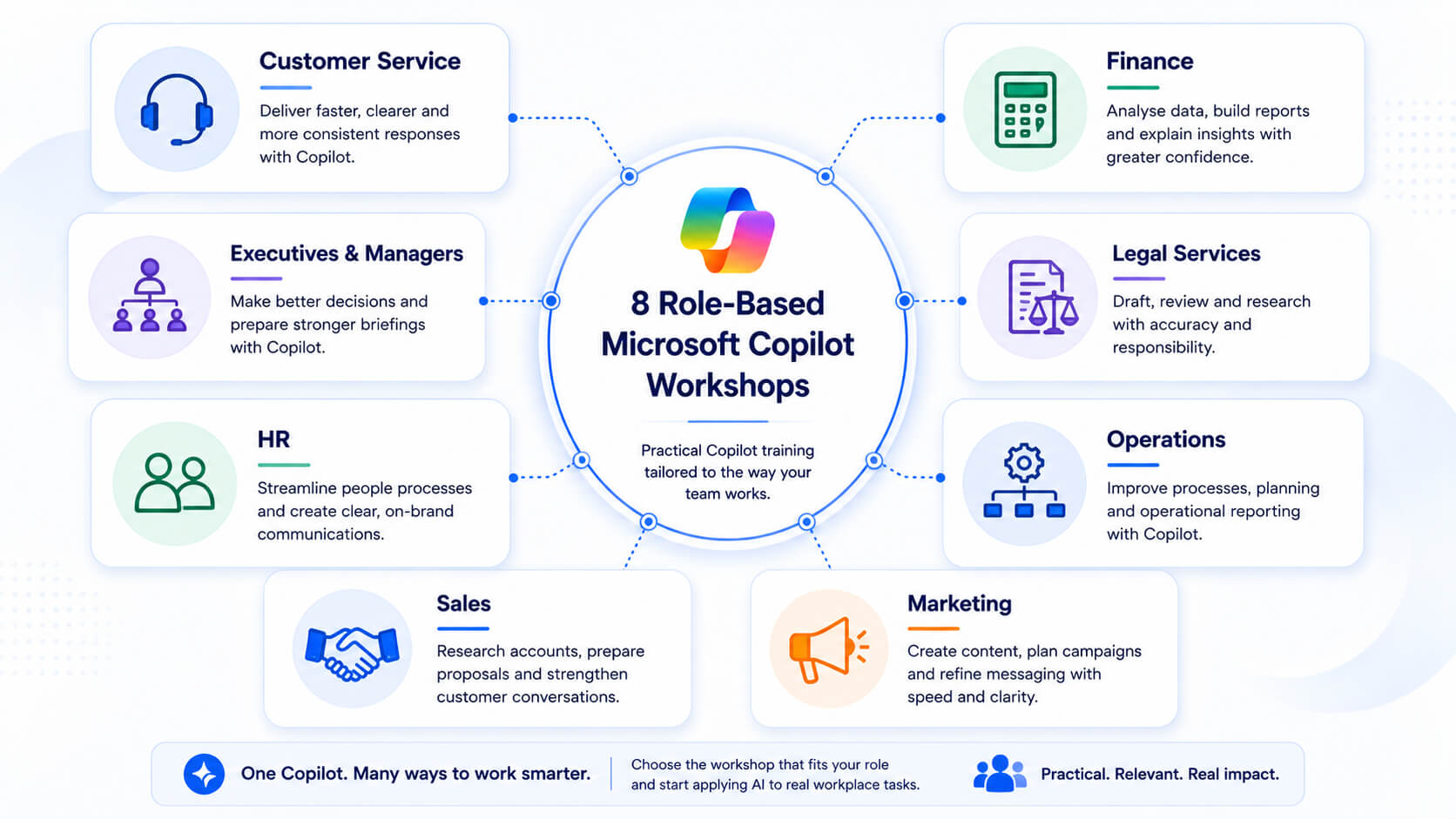
Eight role-based Microsoft Copilot workshops for customer service, executives and managers, HR, finance, legal services, operations, sales and marketing.
Nexacu offers role-based Microsoft Copilot workshops for eight common workplace functions.

Helps customer service teams prepare clearer responses, summarise customer issues and improve communication consistency.

Best for: customer service, support, helpdesk and client-facing teams.

Supports leaders with briefings, summaries, decision preparation, meeting follow-ups and structured thinking.

Best for: executives, managers, department heads and senior decision-makers.

Helps HR teams draft communications, support policy work, prepare guidance and improve people-related workflows.

Best for: HR advisors, people and culture teams, recruitment teams and L&D professionals.

Focuses on data analysis, financial commentary, reporting support and careful validation of AI-assisted outputs.

Best for: finance teams, analysts, accountants, commercial managers and reporting teams.

Shows legal and compliance teams how to use Copilot for drafting, review, research and structured preparation.

Best for: legal teams, compliance teams, contract managers and governance professionals.

Supports operational planning, process documentation, coordination, reporting and day-to-day execution.

Best for: operations managers, coordinators, administrators and process improvement teams.

Helps sales teams research accounts, prepare for conversations, draft follow-ups and support proposal preparation.

Best for: sales representatives, account managers, business development teams and sales leaders.

Supports campaign planning, content development, research, messaging, content repurposing and workflow improvement.

Best for: marketing coordinators, campaign managers, content teams and digital marketers.

3) How to Choose the Right Copilot Workshop

The best workshop depends on the work your team needs to improve. Start by identifying the team’s most common tasks, repeated pain points and current Microsoft 365 usage.
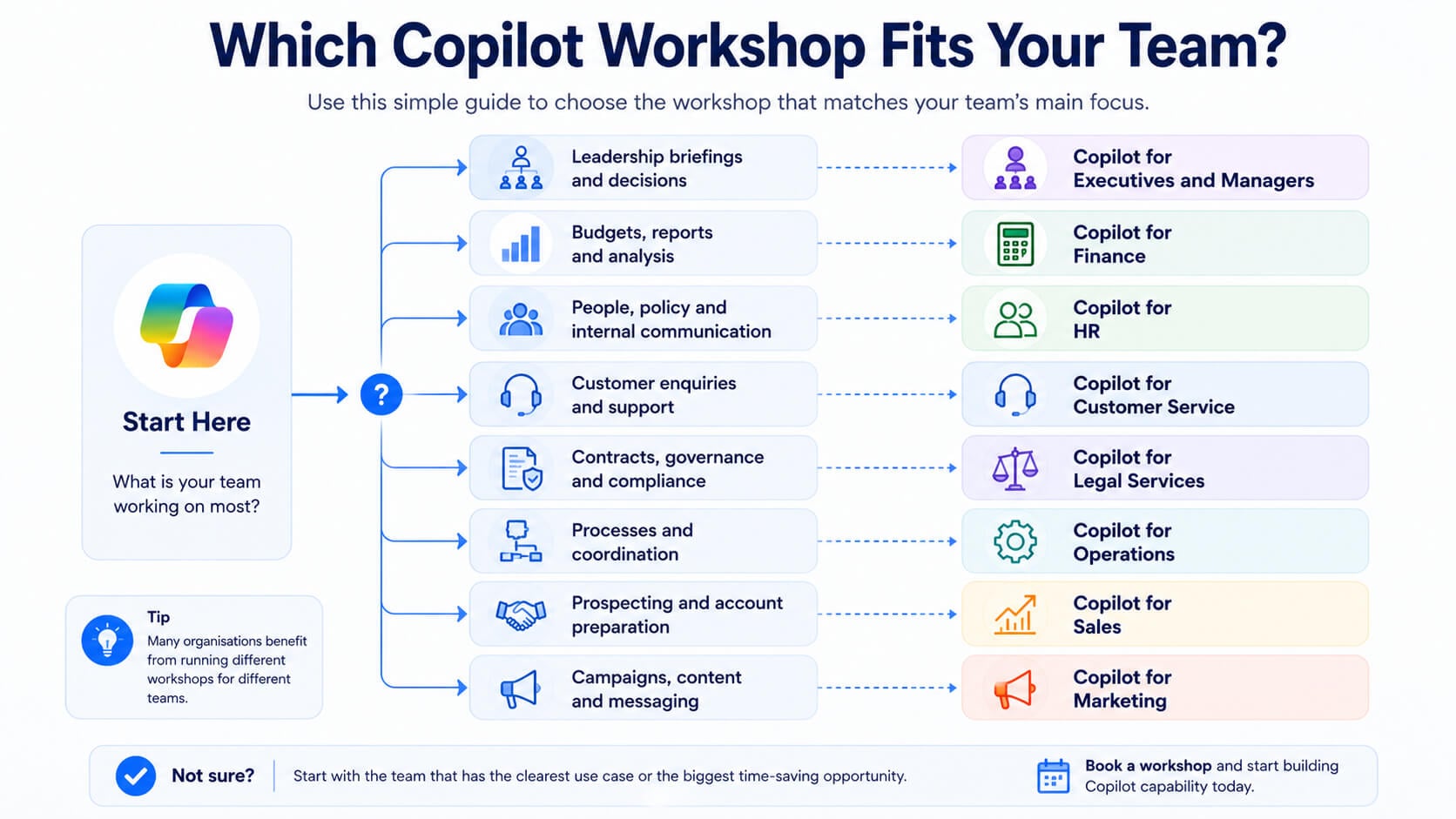
Decision guide for choosing the right Microsoft Copilot workshop based on a team’s main tasks and responsibilities.
Match your team’s main responsibilities with the most relevant role-based Copilot workshop.
Recommended workshop by team need
Leadership briefings and decisions
Choose Copilot for Executives and Managers.
Budgets, reports and analysis
Choose Copilot for Finance.
People, policy and internal communication
Choose Copilot for HR.
Customer enquiries and support
Choose Copilot for Customer Service.
Contracts, governance and compliance
Choose Copilot for Legal Services.
Processes and coordination
Choose Copilot for Operations.
Prospecting and account preparation
Choose Copilot for Sales.
Campaigns, content and messaging
Choose Copilot for Marketing.

For larger teams, the strongest approach is often to prioritise departments with high Microsoft 365 usage, repeated admin work, reporting pressure or frequent communication tasks.

4) What About AI for Business Leaders and Managers?

Role-based Copilot workshops are designed for practical team adoption. They help employees use Microsoft Copilot in their day-to-day role.

AI for Business Leaders and Managers has a different purpose. It is designed for leaders who need to understand AI from a business strategy, governance, implementation and change perspective.

  • Choose role-based Copilot workshops when teams need practical Copilot skills for their daily work.
  • Choose AI for Business Leaders and Managers when leaders need to plan AI adoption, governance and organisational change.
  • Use both when your organisation wants to support practical adoption and leadership-level AI strategy.

This distinction is important. Teaching employees how to prompt Copilot is not the same as helping leaders decide how AI should be used, governed and scaled across the business.

Build Copilot Capability by Role, Not Just by Tool

Microsoft Copilot can support productivity, communication, analysis and decision-making. But the best results come when people understand how to apply it to the work they are responsible for.

Role-based training gives teams a clearer path. Instead of asking every employee to interpret Copilot for themselves, organisations can provide practical training that reflects how different functions actually operate.

Ready to choose the right workshop?

Explore Nexacu’s Microsoft Copilot courses

Compare role-based Copilot workshops and choose the training pathway that matches your team’s responsibilities.

Training can help your team:
  • Use Copilot more confidently
  • Apply AI to real workplace tasks
  • Improve prompting and output review
  • Support broader AI adoption

5) Frequently Asked Questions

These are common questions organisations ask when choosing Microsoft Copilot training.

What is role-based Microsoft Copilot training?

Role-based Microsoft Copilot training teaches users how to apply Copilot to the tasks, decisions and workflows of a specific business function, such as finance, HR, sales, marketing or operations.

Who should attend a role-based Copilot workshop?

Employees, managers and teams who already use Microsoft 365 tools and want to apply Copilot to practical workplace tasks should attend a role-based workshop.

Should we choose a generic Copilot course or a role-based workshop?

Choose a generic Copilot course for broad platform knowledge. Choose a role-based workshop when the priority is practical relevance for a specific team or function.

Which Copilot workshop is best for managers?

Copilot for Executives and Managers is the best fit for managers who need support with summaries, briefings, planning, decision preparation and team communication.

Is AI for Business Leaders the same as a Copilot workshop?

No. Role-based Copilot workshops focus on practical Microsoft Copilot use by function. AI for Business Leaders and Managers focuses on AI strategy, implementation, governance and organisational adoption.

Can different teams take different Copilot workshops?

Yes. This is often the best approach. Different teams use Copilot in different ways, so role-specific training can make adoption more practical and relevant.

Nexacu is a Lumify Group company, delivering Microsoft, Adobe, data analytics, AI tools and professional development training to teams across Australia.

Trusted Nationwide by Leading Organisations

at Nexacu, we're proud to be the trusted training partner for hundreds of leading organisations across Australia and New Zealand. From government departments to top corporates, we help teams upskill and succeed everyday

  • 400+ companies rely on Nexacu for team training
  • Trusted by federal, state, and local government agencies
  • Delivering training across 9 countries

Why Nexacu?

step by step courseware

Step by Step Courseware

Custom workbook included with a step by step exercises

Facility Image 2
Facility Image 3
Facility Image 1

Interactive real time training

Interactive, Real-Time Training

Learn with expert instructors, wherever you are

More than 1,300 Business trust Nexacu

Trusted by Business

Procured by Government

Procured by Goverment

Reviews Not Found

Valued by Individuals