Shadow AI in Australian Workplaces: Why Banning Tools Makes It Worse
Most Australian workers already use AI at work, often without telling anyone. The answer is not a broader ban. What would help are a clear risk assessment, practical training and better visibility.
01
What shadow AI actually is, and what it is not
Shadow AI is what happens when someone pastes a client email into a free chatbot to get help with a reply, and does not tell anyone.
It is the coordinator drafting copy in a personal ChatGPT account because the corporate licence has not been assigned. It is the analyst running a spreadsheet through a browser extension they found last week. The term borrows from shadow IT, but shadow AI behaves differently in three important ways.
What shadow AI is not: it is not sabotage, and it is usually not ignorance of the rules. In many organisations, the rules either do not exist or nobody can remember what they say. That is why bans fail, and why this is a capability problem before it is a compliance one.
02
The number that gives it away
The Australian Bureau of Statistics reported in June 2026 that around 12% of Australian businesses used AI in 2024 to 2025. Large businesses sat at 35%, medium businesses at 22%, and small businesses at about 11%.
Research from RMIT Online and Deloitte Access Economics published in March 2026 found that 84% of Australians use at least one AI tool at work.
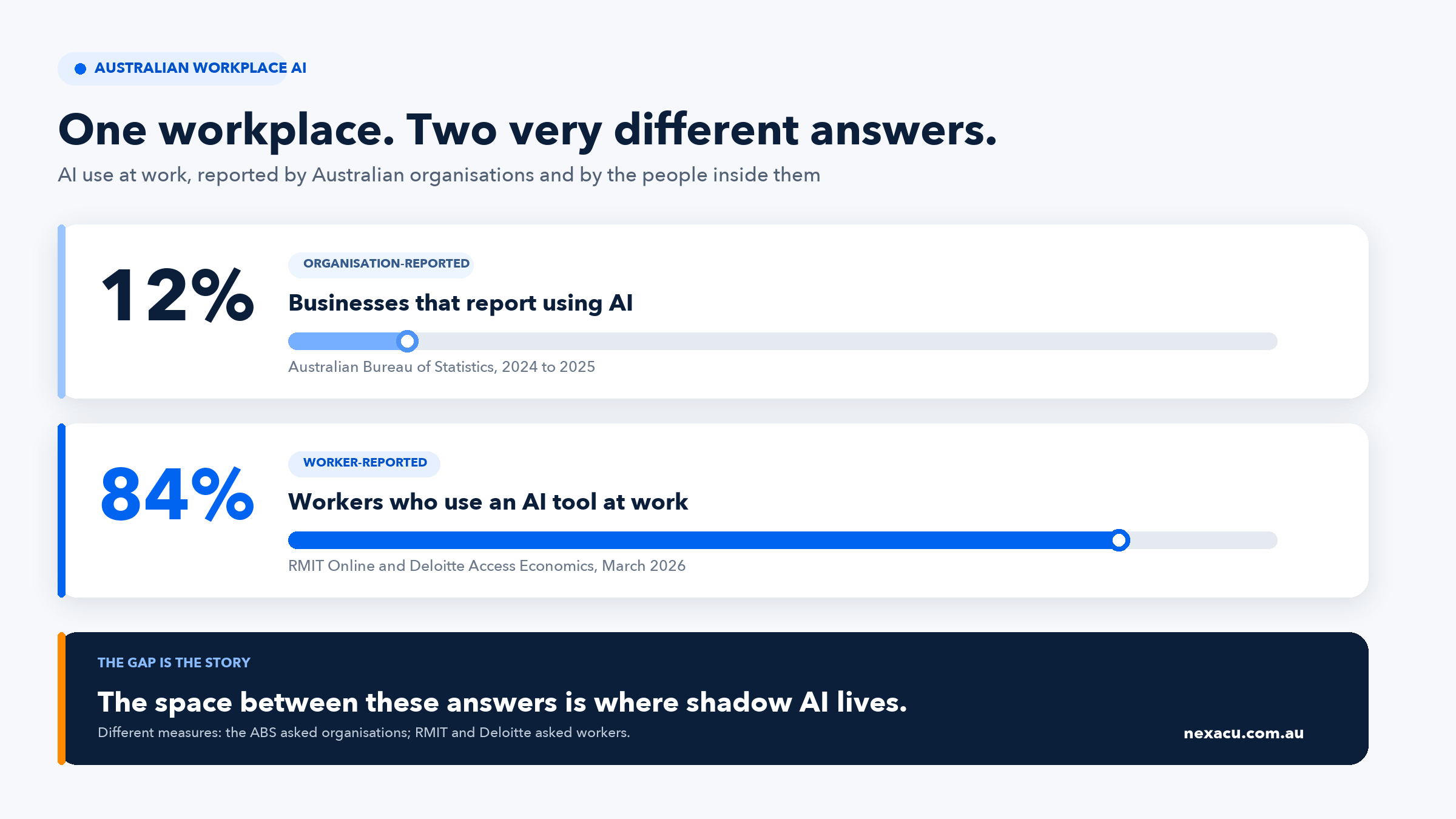
These are two different questions. The ABS asked businesses whether the business used AI. RMIT and Deloitte asked workers whether they use AI tools in their job. They were never going to match exactly. But a gap that size is not a rounding error.
The gap is the point
Most Australian organisations would answer, “No, we do not use AI.” Most of their staff would answer, “Yes, I do.” The space between those two answers is where shadow AI lives.
03
Why your people are doing it
None of the four reasons below is defiance. That is the useful thing to notice.
1. The sanctioned tool was never explained
Buying licences is not the same as building capability, a point we have made before about why a Copilot licence alone does not deliver value. The RMIT Online and Deloitte research puts numbers on it. Only 48% of Australian workers receive any AI training from their employer, and just 11% get structured, ongoing support. Around 49% teach themselves through ad hoc trial and error.
If half your workforce is learning AI by guessing, you do not have an AI strategy. You have a large, unsupervised experiment.
2. They do not know what they are allowed to do
Ask five people whether they are permitted to paste a customer's name into an AI tool. If you get five different answers, the policy is not the problem. The absence of one is.
3. The approval process is slower than the work
When getting a tool approved takes six weeks and the report is due Thursday, people make a rational choice. Shadow AI is very often a symptom of procurement latency rather than poor judgement.
4. Nobody told them the sanctioned tool could do it
Staff use a free public chatbot for a task their licensed enterprise tool handles better, more securely, and with their own organisational data already connected. They simply did not know.
This is what a short, practical course like AI Prompting Fundamentals is designed to fix. Prompting is not inherently difficult, but knowing which tool to reach for is a skill nobody is born with.
04
What it actually risks
This is the part most shadow AI articles get wrong. Saying you might breach a policy is not a risk argument. Here is the actual exposure.
Risk 1
Prompt injection: your data leaves without anyone pasting it
Prompt injection has ranked first in the OWASP Top 10 for LLM Applications for three consecutive years, including the 2026 edition published in August 2026. Sensitive information disclosure ranks second and excessive agency third.
The attack does not need a careless employee. Instructions hidden in content the AI reads are enough.
- EchoLeak (CVE-2025-32711) was the first documented zero click indirect prompt injection against a production system, in this case Microsoft 365 Copilot. Instructions concealed in an incoming email caused Copilot to exfiltrate recent emails and drafts through an automatically loaded image URL. The user did nothing but receive a message.
- Brave Research demonstrated the same class of attack against an AI browser in August 2025, using white on white text and HTML comments in a webpage to extract a user's email address and a one time password. In October 2025 they showed the same thing hidden inside screenshots.
EchoLeak was patched centrally because it was in a sanctioned enterprise product. A personally installed AI browser or extension sits behind none of your controls and generates no telemetry you can search afterwards.
Risk 2
Vendor and supply chain risk
The consumer and business tiers of the same product are governed by different terms, and that split is the whole problem.
- OpenAI trains on consumer ChatGPT conversations by default unless the user opts out. It does not train on inputs from ChatGPT Team, Enterprise or the API.
- Anthropic trains on Free, Pro and Max account data where the setting is on, with retention extended to five years for those accounts. Team, Enterprise and API are excluded.
An employee on a personal account sits on the training by default, long retention side of that line no matter what your enterprise agreement says.
Vendor security maturity also varies enormously. In January 2025 Wiz Research found a publicly exposed, unauthenticated DeepSeek database leaking over a million log entries including chat history, API keys and plaintext passwords. The risk extends past the vendor too: in November 2025 OpenAI notified customers of a breach at Mixpanel, an analytics sub-processor. OpenAI's own systems were not breached.
Risk 3
Identity and access
This is the least discussed and, for most organisations, the most serious. Around 67% of enterprise AI usage happens through unmanaged personal accounts, and 82% of data pastes into AI tools originate from personal accounts. Netskope's January 2026 report found incidents of sensitive data sent to AI apps doubled year on year.
A personal account is outside your single sign on, outside your multi factor policy, and outside your offboarding. When that person leaves, the account and everything in it leaves with them.
- The Salesloft Drift breach is the case to know. In August 2025, a threat actor abused compromised OAuth tokens belonging to an AI chat agent to reach multiple corporate Salesforce instances, hunting for AWS keys, passwords and Snowflake tokens. Nobody breached Salesforce. One AI vendor's OAuth grant became a key to hundreds of tenants.
- In January 2026, researchers found two Chrome extensions with roughly 900,000 users between them exfiltrating full ChatGPT and DeepSeek conversations and every browser tab URL, including internal corporate URLs, every thirty minutes. One carried a Google “Featured” badge.
That last detail is worth sitting with. Internal hostnames, tenant identifiers and internal path structures are reconnaissance material, and they were leaving through something staff installed believing it was a productivity aid.
Risk 4
You cannot report what you cannot see
Australia's Notifiable Data Breaches scheme recorded 1,205 notifications in 2025, the highest annual total since the scheme began, with 59% attributed to malicious or criminal activity.
Shadow AI does not create an exemption. It creates an inability to comply. You cannot assess or notify an eligible data breach involving a system you did not know existed, on an account you cannot access, at a vendor you have no contract with.
IBM's 2025 breach research puts the additional cost of shadow AI at USD $670,000 per breach, and found that 97% of organisations suffering an AI related security incident lacked proper AI access controls.
05
Why banning it makes things worse
The instinct is to block the domains and issue a stern email. It fails for a reason that is easy to predict once you have seen it happen.
“If employees are unable to work in the sanctioned tools, they will likely go around the organisation's controls and start using shadow AI, which presents far greater risks.”
Gartner, guidance on managing AI agent sprawl, April 2026
A ban does not remove the demand that created shadow AI. It removes your visibility of it. The work still gets done, just on personal devices and personal phones, where you have no logging, no data controls and no idea it is happening.
The goal is not less AI use. The goal is less unobserved AI use.
That said, the reverse mistake is just as damaging, and the next section exists because of it. Permitting AI without first establishing whether it is appropriate in your environment is not governance either.
06
What works instead: assess, decide, sanction, train, monitor
Five steps, in this order. The order is the point, and most organisations start at step three.
Step 1
Assess
Before anything else, work out whether AI is safe to use here at all, and in what form. This is a security and risk function, not a staff preference exercise.
Some environments should prohibit general purpose AI tools outright. Defence, intelligence, classified, and some health and legal contexts are obvious cases. As a concrete marker of where that line sits, Microsoft's agent mode is not available in GCC, GCC High, DoD or sovereign clouds at all. If your environment is one where that matters, no amount of staff training changes the answer.
Others need a locked down deployment rather than a general one: tenant hosted, no consumer connectors, restricted data grounding, logging on. The joint Five Eyes guidance Careful adoption of agentic AI services, published 30 April 2026 and co authored by the ACSC, is the reference point. It names prompt injection, agent identity compromise, unvetted third party components and privilege creep as the risks to work through.
Step 2
Decide
Security sets the boundary of what may be explored. Not staff, and not the enthusiasm of whoever got there first. The output of this step is a governance framework and a documented risk position, which is what a usable policy is later written from. A policy written before this is guesswork.
Step 3
Sanction
Now name the approved tools. Two or three, not fifteen. State what each may be used for and what may never be entered into it. Publish it where people will find it. The most common failure is approving a tool and never telling anyone.
Step 4
Train
Training is what turns a policy into behaviour. It needs to cover four things specifically.
- What data must never leave, named concretely, and why.
- Which tool for which task, so people stop reaching for a public chatbot to do something their licence already covers.
- How to recognise a prompt injection attempt, and why output that asks you to take an action should be treated as untrusted input.
- How to check output before it reaches a customer, the public or an executive.
Step 5
Monitor
Once tools are sanctioned and people are trained, monitoring becomes reasonable rather than adversarial. You are checking that a system works, not hunting for offenders. Staff can tell the difference, and it determines whether they cooperate.
Ban and block versus assess, sanction and train
| Outcome | Ban and block | Assess, sanction, train, monitor |
|---|---|---|
| AI use | Continues, unobserved | Continues where permitted, visible |
| Where AI use happens | Personal devices and accounts | Managed environment |
| Identity and access | Outside SSO and offboarding | Federated, revocable |
| Vendor terms | Consumer, often trains on input | Contracted, no training on input |
| Data exposure | Unknown and unmeasurable | Logged and bounded |
| Staff response | Concealment | Participation |
| Breach notification | Not possible | A record of actual events |
07
A 30, 60, 90 day plan
Nothing here requires new headcount or a consulting engagement. Run it with the people you have.
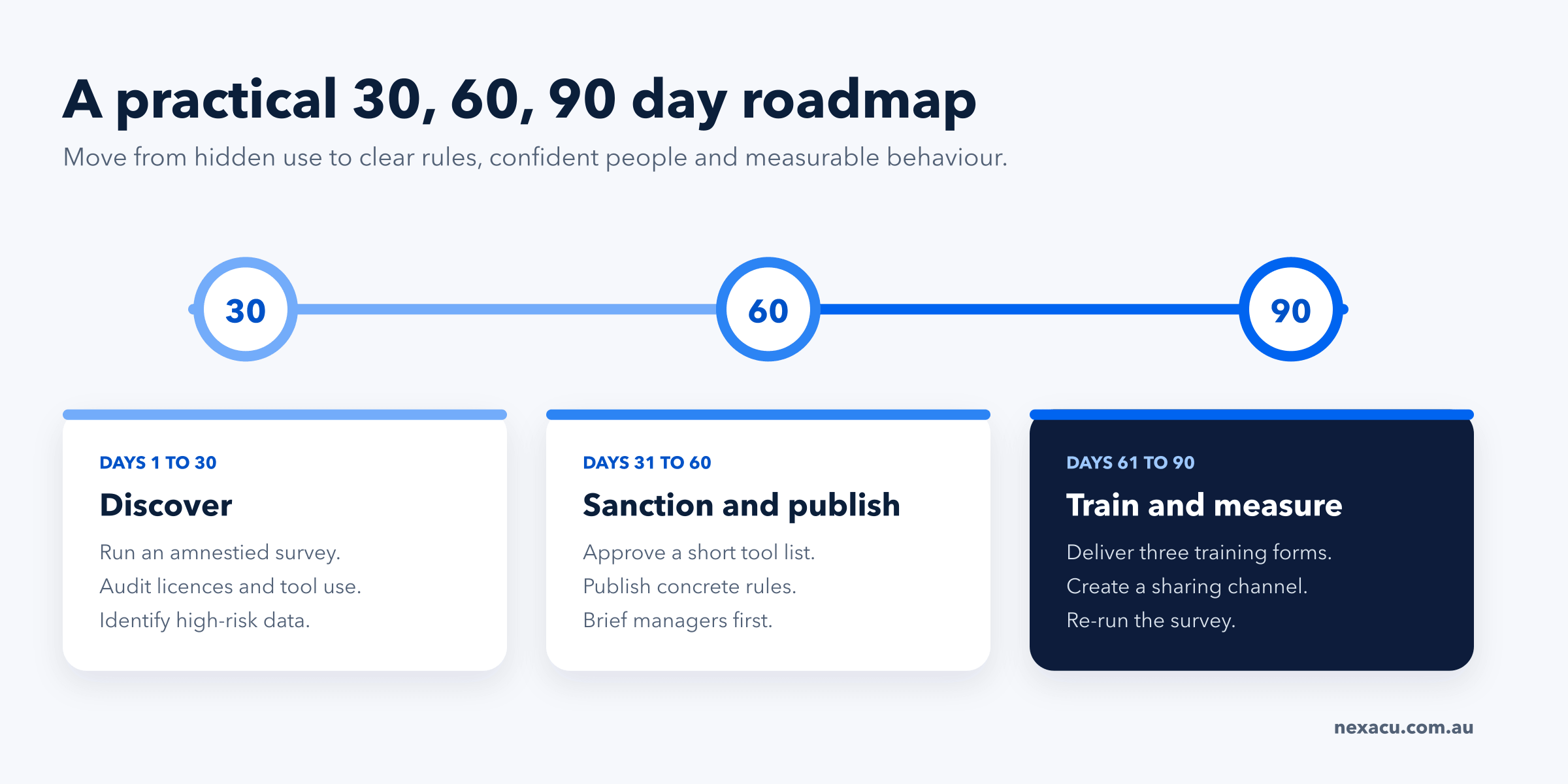
Days 1 to 30
Assess before you permit
- Run a risk assessment first. Determine whether general purpose AI tools are appropriate in your environment at all, which data domains are out of scope entirely, and whether you need a restricted deployment rather than a general one.
- Have security and risk set the boundary of what may be explored, before any tool evaluation begins.
- Run a short, explicitly amnestied survey to find out what is already happening. Say plainly that no one is in trouble.
- Check which licences you already pay for, and how many are genuinely used.
Days 31 to 60
Decide, then write it down
- Agree a governance framework and a documented risk position. The policy is written from that, not instead of it.
- Approve a short list of tools with specific permitted uses and named prohibited data.
- Decide who may connect AI tools to corporate systems, what OAuth grants are permitted, and who reviews them.
- Brief managers before staff. AI for Business Leaders and Managers is usually the first cohort to train, not the last.
Days 61 to 90
Train and open it up
- Deliver training against the four points in the previous section: prohibited data, tool selection, recognising prompt injection, and checking output.
- Read what the DTA Copilot trial found about training before designing the programme.
- Create a place where people share what works, so good practice spreads instead of hiding.
- Re-run the survey. Movement in unapproved tool use is your actual measure of success.
08
What the rules require in Australia
Private sector organisations
Australia has no AI specific statute. The National AI Plan, released on 2 December 2025, did not proceed with the mandatory guardrails proposed in the 2024 consultation, relying on existing technology neutral law.
That is not the same as having no obligations. Privacy law, the Notifiable Data Breaches scheme, consumer law, confidentiality obligations and work health and safety duties all still apply. The OAIC advises against entering personal information into publicly available generative AI tools, and expects organisations using AI to have policies, controls, human oversight and robust training and auditing measures.
Public sector organisations
Training is now mandatory. The Digital Transformation Agency's Policy for the responsible use of AI in government version 2.0 took effect on 15 December 2025. It makes foundational AI training mandatory for all APS staff, with the first requirement commencing 15 June 2026.
In New South Wales, the AI Operational Policy requires public servants to complete AI literacy and policy training if they use AI in their work, and requires agencies to make those courses available.
If you supply into government, expect this requirement to arrive in your contracts before it arrives in legislation.
Build safe AI capability
Related Nexacu courses
Practical training for the people approving, using and governing AI at work.
AI Governance Training
1 day | $560
Practical governance for leaders and decision makers covering accountability, data governance, risk and responsible adoption.
AI for Business Leaders and Managers
1 day | $595
For the people who need to explain the policy, lead adoption and make informed AI decisions.
AI Prompting Fundamentals
1 day | $595
Practical prompting across tools, so staff get useful results from the sanctioned option.
Copilot for M365
1 day | $490
Help teams do securely in Microsoft 365 what they may otherwise do in a public chatbot.
Training a whole team? Team AI training can be delivered on site or live online, tailored to your policy and tools.
Common questions
Frequently asked questions
Free PDF survey template
Start with the amnestied AI use survey
Ten anonymous questions, the amnesty wording that encourages honest answers, guidance on how to run the survey, and a short guide to reading the results.
Download the survey PDFDo this next
Start the risk assessment, and run the amnestied survey alongside it. You cannot govern what you have not measured, and most organisations discover that AI use is higher than leadership assumed while the reasons people use unapproved tools are entirely fixable.
Sources
- Australian Bureau of Statistics, Business adoption of artificial intelligence accelerates in 2024 to 2025, 25 June 2026.
- RMIT Online and Deloitte Access Economics, Beyond Prompting: Measuring the Generational AI Gap, 25 March 2026.
- Jobs and Skills Australia, Our Gen AI Transition, August 2025. The 27% figure is sourced to Deloitte Access Economics 2024, cited within.
- OWASP Gen AI Security Project, Top 10 for LLM Applications 2026, August 2026.
- Aim Security and Microsoft, EchoLeak (CVE-2025-32711), zero click indirect prompt injection in Microsoft 365 Copilot, 2025.
- Brave Research, Indirect prompt injection in agentic browsers, 20 August 2025, and unseeable prompt injections, 21 October 2025.
- Wiz Research, Exposed DeepSeek database leak, 29 January 2025.
- OpenAI, Mixpanel incident, November 2025, and how your data is used to improve model performance.
- Anthropic, Updates to our consumer terms, 28 August 2025.
- Arctic Wolf and Google Threat Intelligence, Salesloft Drift OAuth token compromise (UNC6395), August 2025.
- OX Security, malicious Chrome extensions exfiltrating AI chat data and browser URLs, January 2026.
- LayerX, Enterprise AI and SaaS Data Security Report, October 2025, and Netskope Cloud and Threat Report, January 2026.
- IBM, Cost of a Data Breach Report, 30 July 2025.
- ACSC, CISA, NSA and partners, Careful adoption of agentic AI services, 30 April 2026.
- Office of the Australian Information Commissioner, Guidance on privacy and the use of commercially available AI products, and Notifiable Data Breaches statistics 2025, 6 July 2026.
- Gartner, Six steps to manage AI agent sprawl, 28 April 2026.
- Digital Transformation Agency, Microsoft 365 Copilot evaluation report, October 2024, and AI policy update, 12 January 2026.
- Digital NSW, NSW AI Operational Policy.
- Department of Industry, Science and Resources, National AI Plan, 2 December 2025.