
H1 2026: The Top Skills Australian Teams Invested In and What to Plan for H2
Half the year is done. Before you rush headlong into Q3 budgets, campaigns, and end-of-year pushes, it is worth pausing to ask: what did your team actually learn this year, and is it enough?
Across Australia, organisations have been navigating a skills landscape that looks very different from 2024. AI tools have moved from “nice to have” into everyday workflows. Data literacy has become a non-negotiable. And the gap between teams that invested in upskilling early and those that did not is starting to show in output, efficiency, and staff retention.
This is our H1 2026 wrap-up. Here is what Australian teams prioritised, what the data says about where skills gaps remain, and how to make the most of the second half of the year.
TL;DR: The strongest H1 2026 training signals were AI productivity, Microsoft Copilot, Power BI, Excel, Power Automate and project management.
For H2, Australian teams should prioritise practical AI literacy, stronger data interpretation, workflow automation, and structured training before any major technology rollout.
1) What were the top workplace skills Australian teams invested in during H1 2026?
Based on enrolment data across Nexacu's national training calendar and broader workforce insights from the Jobs and Skills Australia 2025 Occupation Shortage List, these were the standout training categories in the first half of 2026.
Practical read: H1 demand was strongest where skills clearly connect to productivity. Teams were not just buying training for awareness. They were investing where better tool use could save time, improve reporting, reduce manual work, or help employees use AI safely.
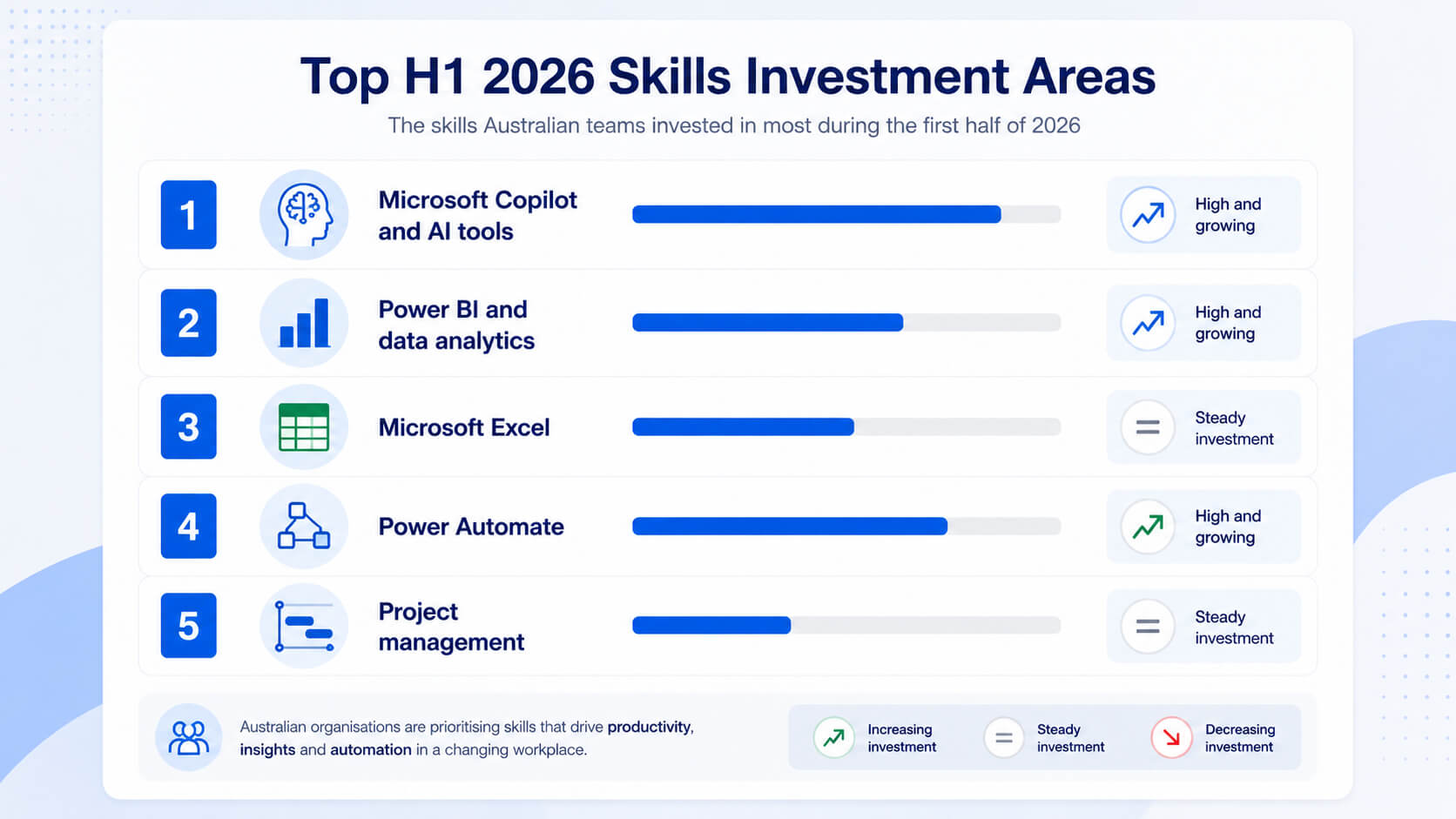
This was the number-one growth area. Demand for Microsoft Copilot training surged as organisations moved past awareness and into deployment.
The driver was productivity pressure. Microsoft's 2025 Work Trend Index found that 75% of knowledge workers globally were already using AI tools at work.
Power BI training has been consistently one of Nexacu's most-booked areas, and H1 2026 was no different.
Dashboards and reports are now expected from managers, analysts and frontline leaders, not just IT or BI specialists.
Excel courses continue to fill seats because the gap between opening a spreadsheet and analysing data properly remains significant across most teams.
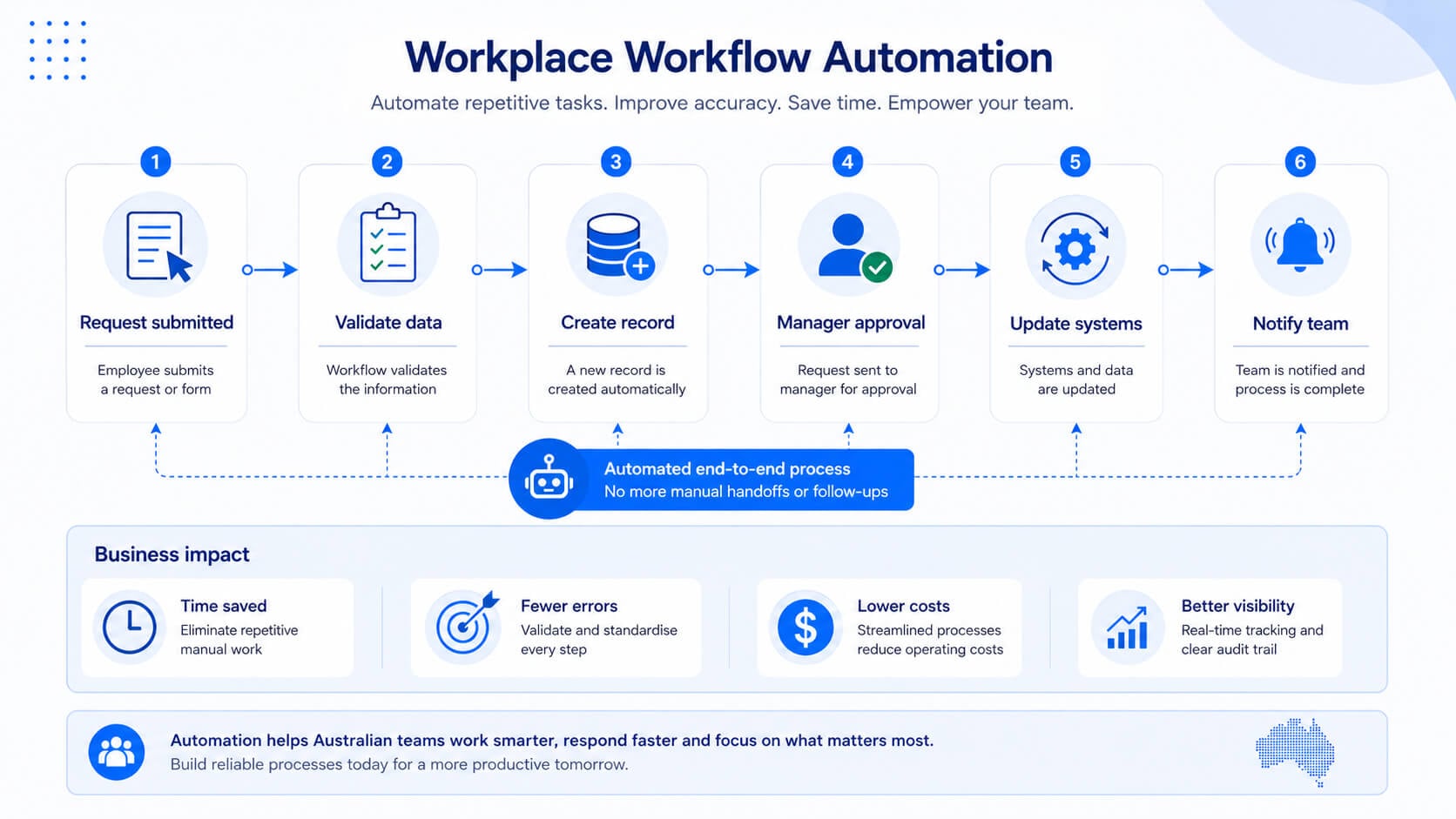
Power Automate training saw strong uptake as organisations looked to reduce repetitive manual tasks such as approvals, notifications, data entry and file management.
Teams investing in Microsoft Project training and foundational project management practices were often responding to a common problem: work was falling through the cracks because ownership, timelines and dependencies were unclear.
Why Microsoft Copilot training grew so quickly
For Australian businesses, structured Copilot training was not just a productivity play. It became a risk management decision. Without clear guidance, employees may still use AI tools, but with inconsistent prompting, uneven output quality, and potential data handling risks.
The organisations that treated Copilot as a workplace capability, not just a software feature, were better positioned to build practical AI habits inside their teams.
Small distinction that matters
AI awareness helps people understand what tools can do. Role-based AI training helps people apply those tools to the work they actually perform. In H2, that distinction becomes more important.
2) What do the numbers say about Australia's skills gaps heading into H2?
The World Economic Forum's Future of Jobs Report 2025 puts it plainly: 39% of core skill sets will need to change by 2030. In Australia, that timeline feels compressed, particularly in professional services, government, education and health, where digital transformation has been slower but pressure to catch up is now significant.
Specific gaps flagged for Australian workers and organisations in H2 2026 include:
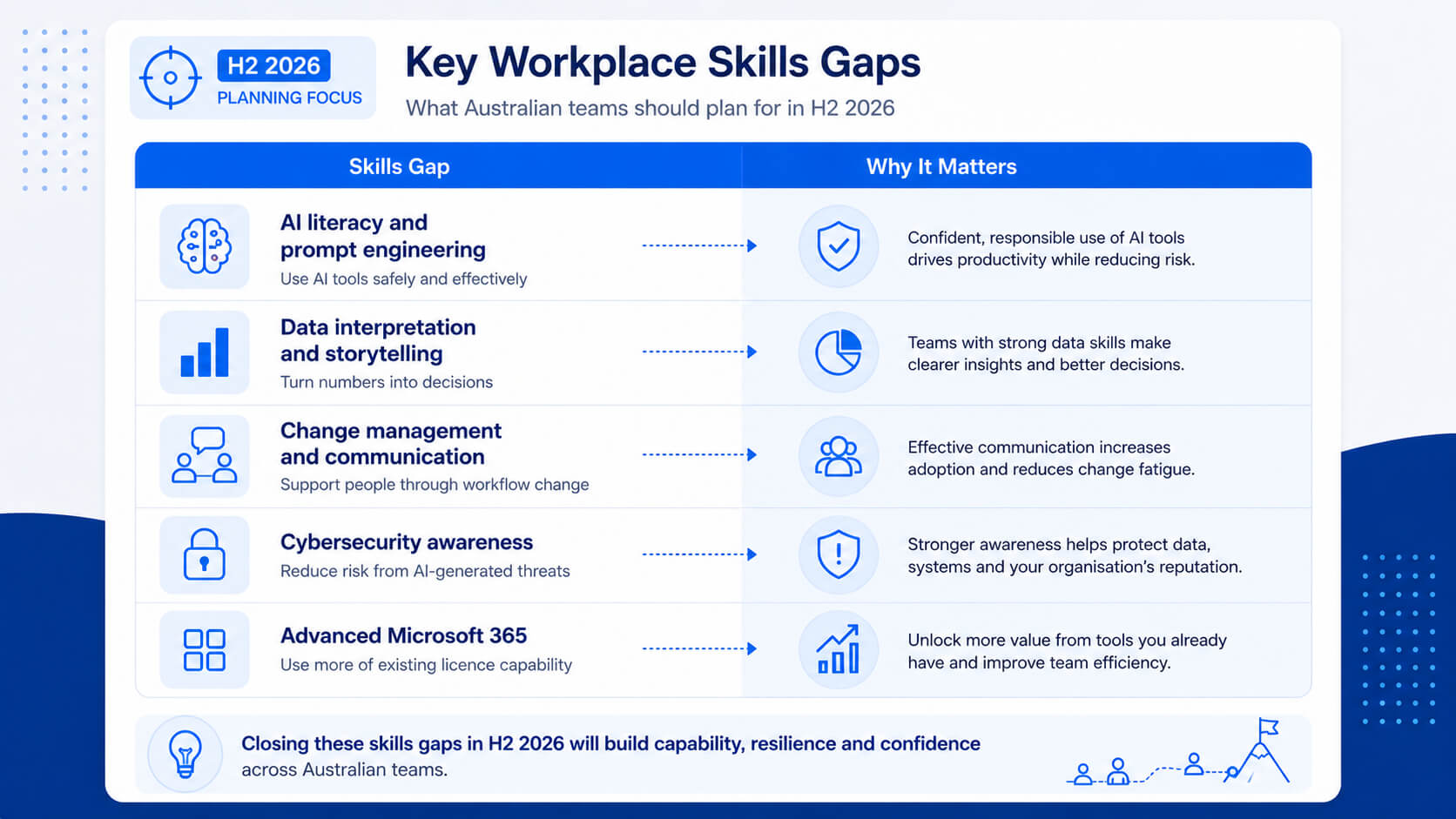
LinkedIn's 2025 Workplace Learning Report found that 7 in 10 L&D professionals said skills gaps were wider in 2025 than the year before. The skills arms race is not slowing down.
3) How should Australian teams plan their H2 training budget?
Getting H2 training right comes down to three questions.
Look at where work is slow, where errors happen most, or where your team is using workarounds because they do not fully understand the tools. That is where training ROI is highest.
If a new system, platform, or process change is coming, training needs to run before the go-live, not after. Build the lead time into your planning now.
The Jobs and Skills Australia Occupation and Industry Profiles give a useful read on employment trends, occupation demand and industry-level workforce patterns across Australia.
Practical H2 training planning tips
- Book early for Q3. July and August fill fast as organisations start the new financial year with fresh budgets. Public course dates go quickly, particularly for Copilot, Power BI and Excel.
- Consider blended learning. Classroom or virtual instructor-led training, followed by on-the-job application, tends to produce better retention than one-off sessions.
- Think in pathways, not one-offs. A team member who does Excel Intermediate today is a better candidate for Power Query or Power BI in Q4.
- Use corporate packages for cost efficiency. If you are training five or more people in the same skill area, a private group session or corporate package often delivers better outcomes and a lower per-head cost than individual bookings.
Simple planning rule: train before the business process changes, not after people have already built bad habits around the new tool.
4) Which H2 training trends should L&D and HR leaders watch?
A few shifts are worth keeping an eye on as you plan the second half of the year.
There is a growing divide between organisations giving staff structured AI training and those leaving it to self-discovery.
The early wave of AI 101 courses is giving way to role-specific training, including Copilot for finance, HR, customer service, sales, marketing, operations and legal teams.
Mandatory skills in privacy, cybersecurity awareness and AI governance are on the radar of organisations navigating the Australian privacy reforms and broader digital governance expectations.
Half-day, full-day and focused two-day formats tied directly to job tasks are seeing the highest completion and application rates.
5) FAQs (expand to read)
These are some of the most common questions teams ask when planning workplace training for the second half of the year.
What were the most popular workplace training courses in Australia in H1 2026?
Microsoft Copilot, Power BI, Advanced Excel, Power Automate and project management were the top-performing categories based on enrolment trends. AI productivity tools saw the largest year-on-year growth.
What skills should Australian teams focus on in H2 2026?
Prioritise AI literacy, particularly Microsoft Copilot for specific roles, data analytics with Power BI and Excel, workflow automation with Power Automate, and any skills tied to technology changes planned for Q3 and Q4.
How do I build a team training plan for H2?
Start by identifying bottlenecks and upcoming technology rollouts. Then map training to those gaps in a logical sequence, with foundational skills first and advanced applications after. Contact Nexacu to discuss a corporate training package tailored to your team's specific needs.
Is it too late to book H2 training?
No, but do not wait. July and August course dates fill quickly at the start of the new financial year. Booking now gives you the best choice of dates, formats and the ability to plan pre-work and follow-through properly.
What is the difference between public and private Nexacu courses?
Public courses run on a fixed schedule and are open to individuals from any organisation, which works well for one to four people. Private courses are delivered exclusively to your team on a date and location that suits you, with content tailored to your context. For groups of five or more in the same skill area, private is usually the better value and outcome.
Does Nexacu offer corporate training packages?
Yes. Nexacu offers corporate training packages for organisations looking to train multiple team members across one or more skill areas. Packages include volume pricing, scheduling flexibility and dedicated account support. Contact Nexacu to discuss what is right for your team.
6) Plan your team's H2 training now
The first half of 2026 showed what is possible when Australian teams invest in the right skills at the right time. The organisations that moved early on AI, automation and data literacy are already operating at a different level.
H2 is your opportunity to close the gaps before the end-of-year pressure hits and training falls off the priority list entirely.
Nexacu is Australia's leading end-user training provider, delivering Microsoft, Adobe and professional development courses to teams across Sydney, Melbourne, Brisbane, Perth, Adelaide and nationwide via virtual classroom.
Build stronger AI, data and productivity skills across your team
Explore Nexacu's full course library or contact us for a tailored corporate training package designed around your team's priorities, roles and schedule.
- Microsoft Copilot and AI literacy
Help teams use AI safely and practically
- Power BI and Excel reporting
Turn data into useful business decisions
- Power Automate workflows
Reduce repetitive manual work
Nexacu is a Lumify Group company, delivering accredited and short-course training to corporate and government teams across Australia. We specialise in Microsoft 365, Adobe Creative Cloud, data analytics, AI tools and professional development.

































